System Images
System Images is the operator workflow for discovering, downloading, and tracking firmware images that Kerrigan can serve to DevKits during netboot and firmware update operations.
OTA firmware updates
The Firmware Update action in the pool and device dialogs offers latest GA or a selected mirrored 3.0 pre-release build. Selecting pre-release queries the mirror for master and develop builds with a full-system palette SWU artifact. Search by branch or build number, select a build, and review the confirmation. Use Refresh builds to fetch the current catalog again. Recovery-image availability and OTA-artifact availability are independent.
GA runs sima-cli update -y. A selected pre-release runs
sima-cli -i update -y -v <version> -f. The explicit version is persisted in the
job; -f allows sima-cli's public-mirror fallback when internal access fails.
Kerrigan rejects selections that have expired from the catalog before queuing.
A pool rollout resolves the selection once and reports ineligible devices as
skipped. Existing API callers that omit version retain the latest behavior.
Selected mirrored builds require Modalix eLxr 3.0 with an A/B layout and a sima-cli version supporting signed full-system SWUpdate. Older layouts require recovery first. sima-cli validates the signature and device update prerequisites; its clean-overlay policy may reset package metadata, with recovery guidance in the job logs. Kerrigan requires an installation confirmation before reboot and verifies the selected running build, a changed slot, and health-confirmed A/B state before completing. A rollback, version mismatch, or unconfirmed boot pauses the job and keeps the device reserved. Inspect the device and installer cleanup before explicitly retrying; cancellation cannot release a device after mirrored installation has started. Paused OTA jobs remain paused across Fleet Manager restarts. Heartbeats and netboot observations do not resume them; an operator must explicitly request a retry. The active firmware reservation remains held while the job is paused.
Admins can discover OTA builds through GET /v1/firmware-updates/available-releases
and supply release_channel: "pre-release" plus version to the existing pool
or target /latest endpoint.
On a 3.0 DevKit, Kerrigan first
looks for GitHub Actions runner units named actions.runner.*.service under
/etc/systemd/system. It saves any matching units in a job-specific directory
under /data/.overlay-daemon-backup, runs the update, reboots the board, waits
for SSH to return, restores and verifies passwordless sudo for sima, and then
restores, enables, and starts the saved services. The OTA job stops before runner
restoration if sudo setup fails; retrying the job repeats that setup without
running the firmware update again.
Before starting a saved runner under /media/nvme, Kerrigan recovers the existing
ext4 filesystem on /dev/nvme0n1p1. It configures the systemd mount with the SSD's
actual UUID, overriding a firmware default UUID, and verifies the mount is writable
and the runner directory exists. This step uses base-system tools, so it also works
before sima-cli is reinstalled after an overlay reset. It never formats storage.
Missing storage, an unexpected mounted source, a read-only mount, or a missing
runner directory stops restoration; inspect the error and explicitly retry the
existing job after repair. Runners under /data do not trigger NVMe recovery.
The runner installation and credentials must already be on persistent storage
under /data or /media/nvme. If a unit points into the overlay, such as a
runner installed under /home, Kerrigan stops before updating and reports that
the runner must be moved. DevKits without a GitHub Actions runner continue
through the update without a restore step. This preservation workflow applies
only to the 3.0 OTA path; 2.x behavior is unchanged.
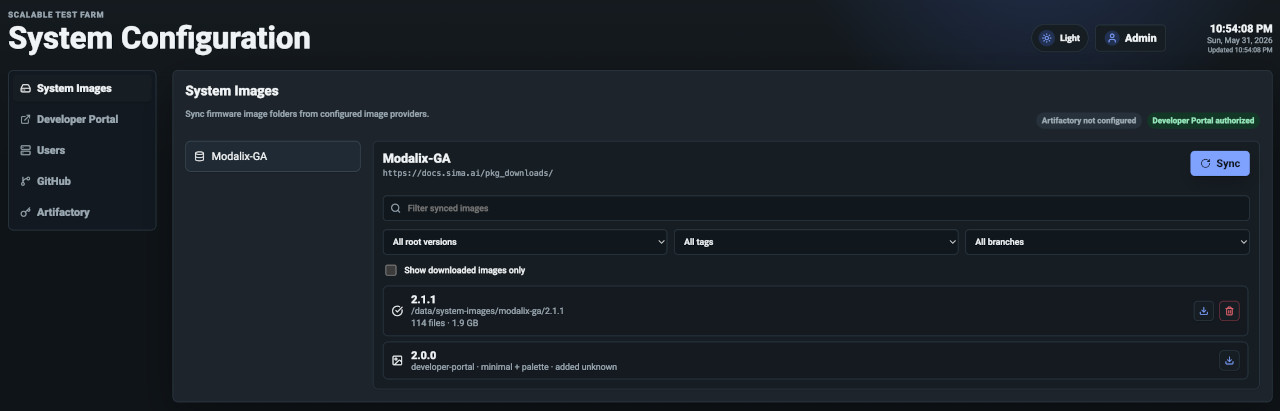
Channels
Kerrigan models images by channel. Current channels include:
- Modalix nightly images from Artifactory.
- Modalix stable images from Artifactory.
- Modalix GA images from Developer Portal.
- Daily Eng Build images from the Vulcan daily platform mirror (Modalix 3.x).
Each channel has a provider, artifact name, board, and source URL. Channels are visible at:
GET /v1/system-images/channels
Provider Setup
Before syncing a channel, configure the provider required by that channel:
- Artifactory channels require Artifactory configuration.
- Developer Portal channels require Developer Portal authorization.
Daily Eng Build requires no provider credentials. It reads the daily platform index and lists complete recovery builds from both daily develop and pre-release master builds, newest build first. These are pre-release engineering images and may be unstable; use them at your own risk.
The System Images page shows whether each provider is ready.
Sync Images
Sync asks the provider for available versions and merges the result with local download state:
POST /v1/system-images/channels/{channel_id}/sync
Sync does not download every image. It refreshes the catalog so operators can choose what should be cached locally.
Download Images
Downloads can run asynchronously:
POST /v1/system-images/channels/{channel_id}/images/{version}/download?async=true
Kerrigan records progress as a download job. Operators can refresh job state, cancel active downloads, and remove local images that should be downloaded again later.
Useful endpoints:
GET    /v1/system-images/local-images
GET    /v1/system-images/download-jobs
GET    /v1/system-images/download-jobs/{job_id}
POST   /v1/system-images/download-jobs/{job_id}/cancel
DELETE /v1/system-images/channels/{channel_id}/images/{version}/local
Local Storage
Images are stored under KERRIGAN_IMAGE_STORE_PATH, defaulting to
.kerrigan/system-images for local development and /data/system-images in the
Docker stack.
Downloaded images are used by TFTP/netboot and firmware update flows. Keep this directory on a disk with enough space for root file system images and related firmware artifacts.
Recover using a daily engineering build
- Open System Images, select Daily Eng Build, and sync the channel.
- Choose a version and download it. Kerrigan verifies the size and SHA-256 of the minimal netboot archive, palette eMMC image, and tRoot blob from that build.
- Edit the DevKit pool and select the downloaded version as its firmware.
- Save the pool. Select Roll Out Recovery to queue netboot recovery for all eligible DevKits in the pool, or start recovery from an individual DevKit.
Devices in active maintenance are eligible for recovery; devices in entering,
exiting, or error maintenance phases are skipped. Recovery preserves the
maintenance window. See Maintenance for
the admission rules.
The rollout also skips devices that are offline, busy, leased, already running a firmware operation, or missing recovery prerequisites. Its result reports the queued jobs and a reason for every skipped device. Automatic recovery uses the same downloaded pool target and supports GA, stable, nightly, and Daily Eng Build channels when a device next registers, changes pools, or heartbeats.
Builds that have expired from the mirror cannot be downloaded again. Images already downloaded remain available in the pool firmware selector.
Recovery detects the running platform before preparing U-Boot and again after
network boot. For 3.x it handles the read-only boot partition and the bootloader's
environment format, then programs tRoot with simaai-trootctl full-flash. A tRoot
failure stops recovery before eMMC flashing. The 2.x path retains its existing
U-Boot preparation and troot_upgrade behavior. DHCP-based Kerrigan netboot is
unchanged.
Recovery stages the images in /tmp when it has enough space, otherwise
/media/nvme/swupdate, and finally /data. Kerrigan prepares the NVMe mount
when available and checks the combined image sizes plus a 64 MiB margin before
uploading. If none is usable, the update fails with the reason for each location.
Storage backed by the eMMC being erased is not eligible for recovery staging.
Private staging files are removed after successful flashing or before restaging
a retried job.
During recovery, Kerrigan checks staging space before uploading images. If /tmp is too small, it temporarily raises its tmpfs limit to 4.5 GiB when available RAM can hold the images with a 512 MiB system reserve. Otherwise, it tries NVMe and then /data. Storage backed by the eMMC being erased is excluded. If no suitable location has enough space, recovery stops before transfer.
Before installing tools during bootstrap or post-recovery setup, Kerrigan switches active internal sw-web.eng.sima.ai SiMa pre-release APT entries in .list files to the public mirror. Agate uses https://debian.neat.sima.ai/daily; Bookworm retains https://debian.neat.sima.ai/pre-release. Existing public repositories, including official repo.sima.ai sources, retain their channel and signing options. Third-party repositories remain unchanged. Original source files are retained under /etc/apt/kerrigan-backups/, preserving their relative paths and using a .kerrigan-backup suffix. On subsequent setup runs, Kerrigan moves older backups out of APT’s source directory to prevent invalid-filename notices, retaining distinct backup contents if a backup already exists. These controlled pre-release mirrors use the documented trusted=yes configuration.
While bootstrap is running or waiting to retry, the device displays bootstrapping even before its agent sends a heartbeat. A terminal bootstrap failure clears this state to offline; successful bootstrap makes the device available as idle unless its agent has already reported another state.
Resume a paused OTA update
Administrators can select Resume verification in the device's Firmware tab. The confirmation requests an explicit retry; restarting Fleet Manager or receiving another heartbeat does not resume a paused OTA job.
After a mirrored installation has been attempted, retry checks the running build and A/B boot health before continuing cleanup. It does not flash the image again or reboot an unverified installation. If activation is still pending, the device rolled back, or a different build is running, inspect and recover the device before retrying verification. The reservation remains held until verification succeeds. A missing installer output marker alone does not prevent a later healthy, correctly versioned boot from completing verification.
A reboot that loses SSH without an exit status is treated as uncertain until reconnection is confirmed. A failed reconnection check pauses the job and retains the reservation rather than exposing a potentially rebooting DevKit as idle.
Mirrored 3.0 OTA choices include daily, pre-release master, and release master
builds with a verified Palette .swu artifact. A release-master build in this
engineering catalog is an explicit release-candidate selection, separate from
requesting the latest GA release. Existing API clients select it using
release_channel: "pre-release" and its full indexed version, for example
3.0.0_release_master_B2479. The API channel value remains unchanged for
compatibility; post-reboot verification still requires the selected build identity.
Updated appliances use daily-platform-images/index-v2.json, falling back to
the original index until the new catalog is published. The original index keeps
daily and pre-release builds for older clients. Release candidates use the
indexed public SWU URL with an explicit SWUpdate certificate, preserving signed
installation without requiring a device CLI catalog update. Internal Agate release APT
sources at sw-web.eng.sima.ai are mapped to the independent debian.neat.sima.ai/release channel.